-
1. Go to Supervisor Dashboard (in Supervise application)
2. Select View My Staff List

3. For each Learner, select View self assessments

If you cannot see the Learner listed in your My Staff List you will need to add them. 4. Select Enrol on new assessment

5. Select the appropriate proficiency from the list below and select Next

If you cannot see the required proficiency listed as an option, this suggests the Learner has already been enrolled on the proficiency by someone else. 6. You can select an optional completion date for the staff member (or leave blank). Select Next when you’re ready to proceed

7. Check the details are correct and select Confirm
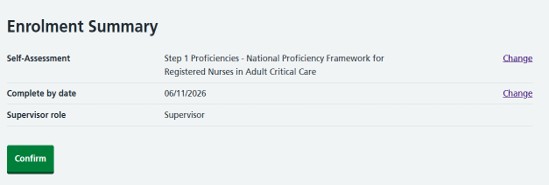
8. The status will update to Not started and the Learner will receive a notification email from noreply@dls.nhs.uk (Subject: You have been enrolled on the profile assessment...)


Page last reviewed: 11 September 2026
Next review due: 11 September 2028
Was this article helpful?
That’s Great!
Thank you for your feedback
Sorry! We couldn't be helpful
Thank you for your feedback
Feedback sent
We appreciate your effort and will try to fix the article
-
Articles in this folder -
You may like to read -
Enrolling Learners onto a self assessment
Modified on Wed, 16 Sep at 11:04 AM